



Directorist - Google Reviews
Show real Google ratings and reviews on your Directorist listings. Owners pick their business; reviews are cached locally.
Directorist – Google Reviews
A new listing on a directory has a credibility problem: it has no reviews, and it won’t have any until someone bothers to write one. The business behind that listing usually has dozens already — on Google.
This extension brings them across. On the Add Listing form, the owner searches for their business with Google Places autocomplete and picks it from the suggestions. From then on, the single listing page can show that place’s average rating, its total review count, and the reviews themselves — as a card grid or a swipeable carousel.
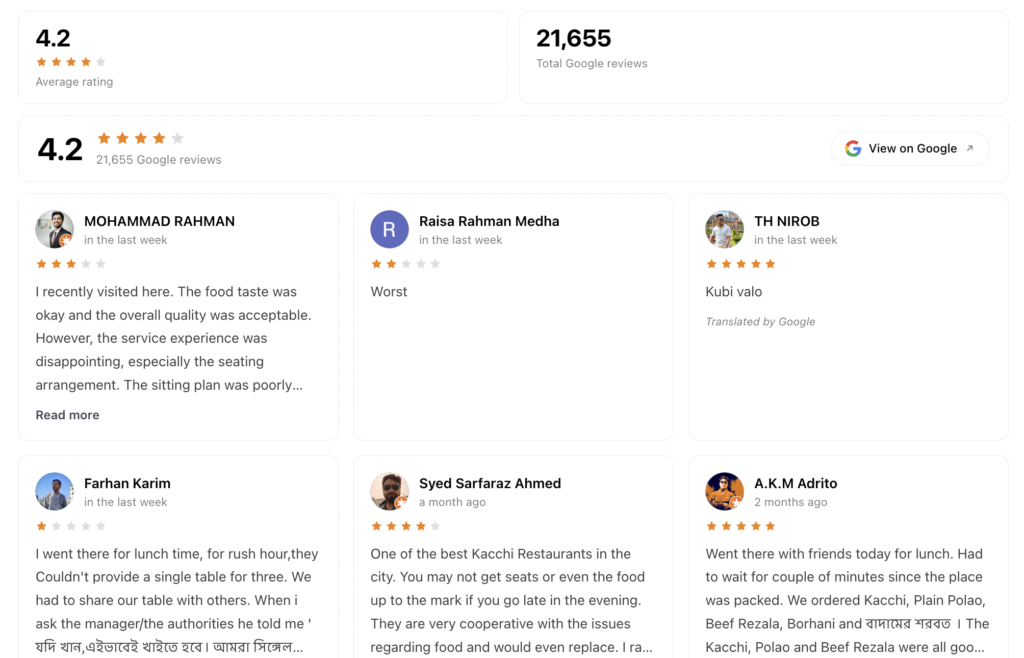
Caption: The stat tiles, summary bar and review cards rendered together on one listing page. Each is a separate field, placed independently.
Owners add their own business
You configure the plugin once. After that, every listing sets itself up.
Drag the Google Place field into your Add Listing form from the Directory Builder and save. On the frontend it renders as Google Places autocomplete — the owner types a business name and picks it from Google’s suggestions. Every rating, count and review the plugin displays afterwards is derived from that single selection.
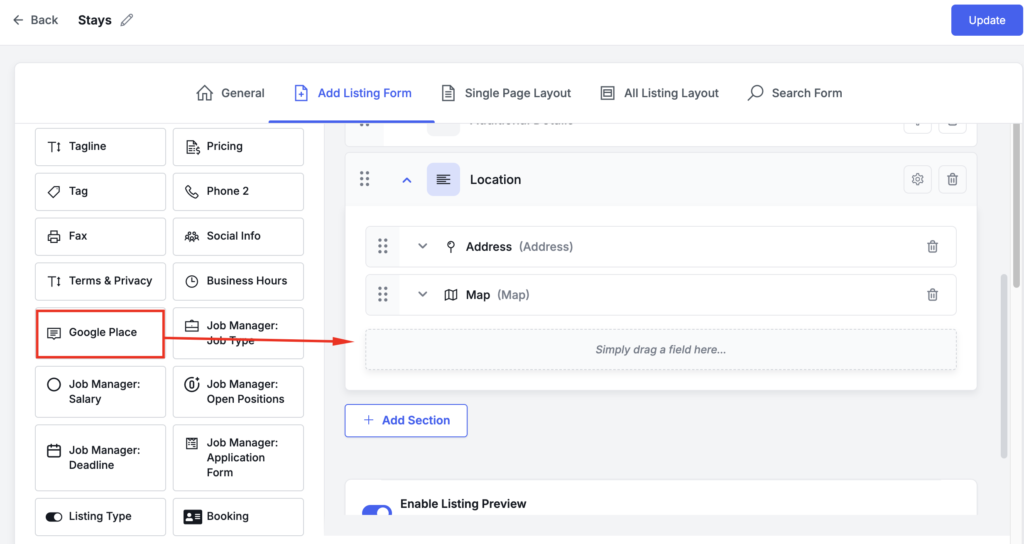
Caption: The Google Place field lives under Preset Fields in the Add Listing Form builder.
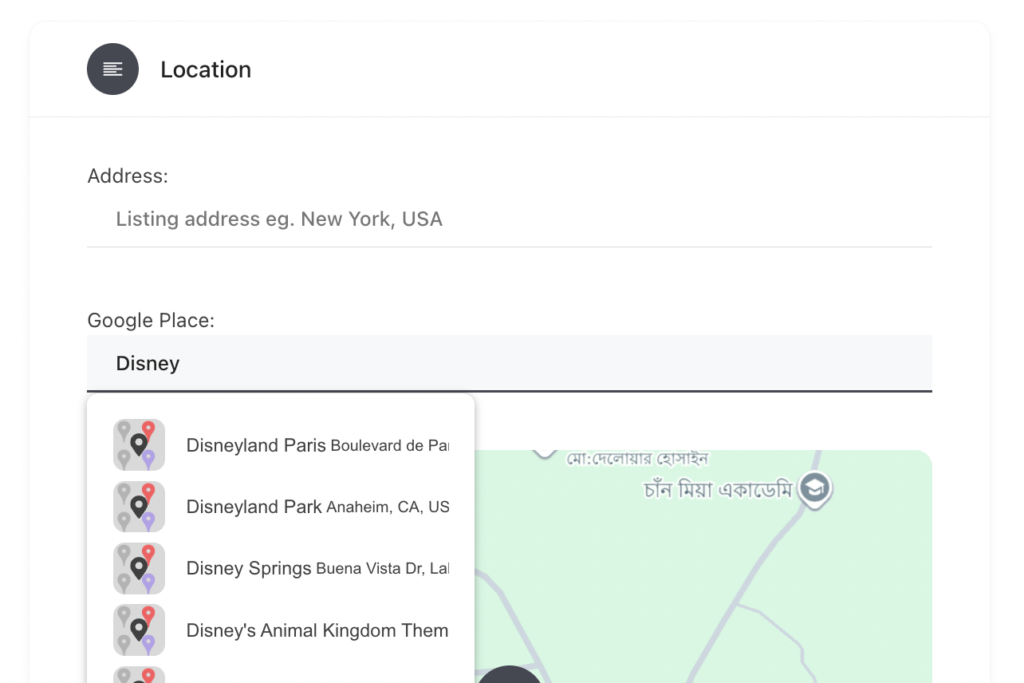
Caption: What the owner sees — type a business name, pick it from Google’s suggestions.
There’s nothing to look up, nothing to paste, and no Place ID for a non-technical business owner to get wrong.
Four fields, placed wherever you want
The plugin registers four independent fields in the Single Page Layout builder, so your rating doesn’t have to sit directly on top of your reviews. Put the stat tiles in a sidebar, the summary bar under the listing title, and the review cards further down the page.
| Field | Renders |
|---|---|
| Google Rating | Summary bar — average score, star row, review count, and a View on Google link |
| Google Rating & Total Reviews | Two compact stat tiles, sized for a sidebar or header strip |
| Google Reviews | Responsive card grid: reviewer avatar, stars, relative date, Read more toggle |
| Google Review Carousel | The same cards in a horizontally scrolling track with arrows and dots |
Use one, use all four. Every one of them reads from your own database — none of them call Google directly.
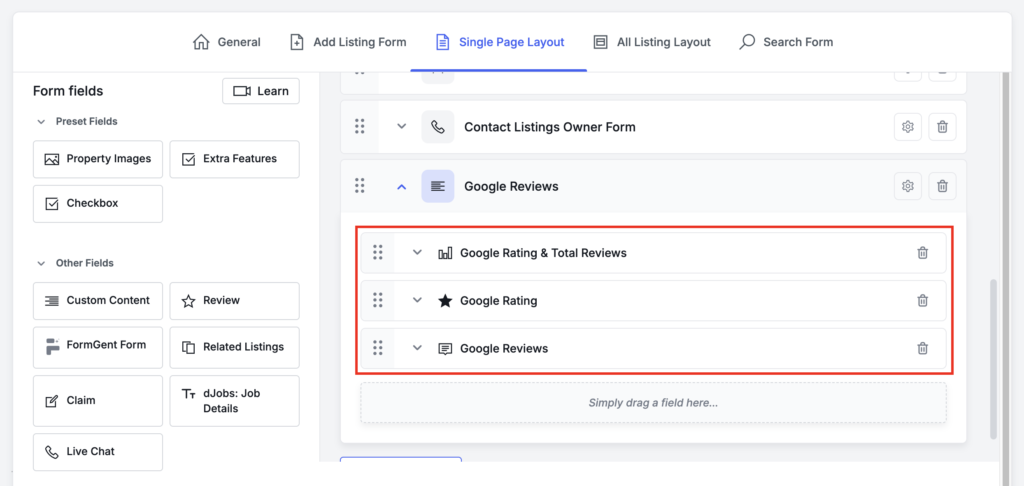
All four fields dropped into a Single Page Layout section. Once placed, a field disappears from the palette so it can’t be added twice.
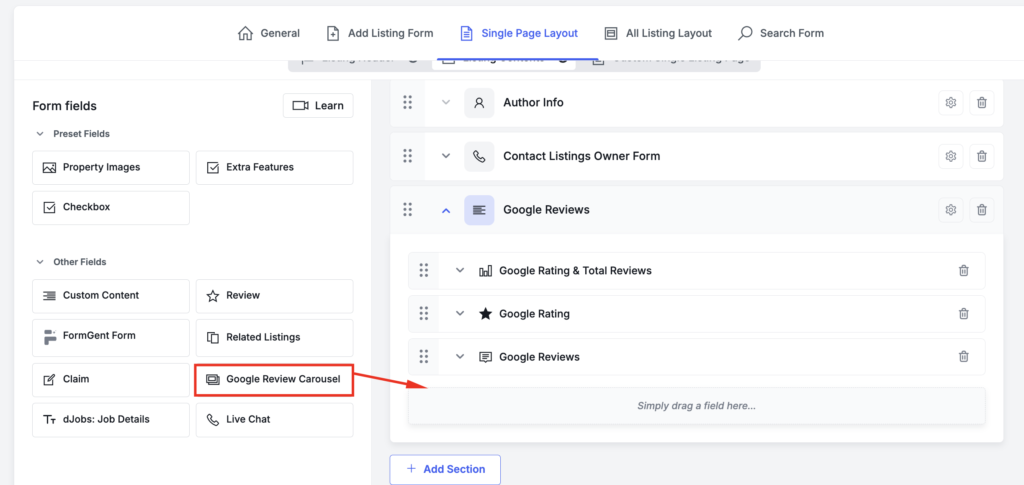
Caption: Dragging the Google Review Carousel into a section.
Reviews are stored, not fetched on every page view
This is the part that matters once your directory has more than a handful of listings.
Most Google review plugins call the Places API when the page loads, or hide the call behind a transient that expires at exactly the wrong moment. This one doesn’t. Reviews are written into a dedicated database table, and every page view is a read from that table.
Refreshes run on a schedule instead: 2 Place Details requests per listing, once every 7 days. That’s the entire cost model, and it doesn’t move when a listing gets featured in a newsletter. Ten thousand visits cost the same as ten.
Everything else follows from that one decision:
- Google going down doesn’t blank your listings. Stored reviews stay on the page, and a failed attempt backs off for 15 minutes rather than turning every page view into another blocking request.
- Changing the business is handled on save. If an owner re-points a listing at a different place, the old reviews are purged and refetched immediately — you’re never showing one business’s reviews under another one’s name. A second check on every page view catches anything that bypasses the form.
- Deleting a listing cleans up after itself. No orphan rows accumulating in the table.
More reviews than the API normally allows
A single Google Place Details response returns at most 5 reviews. That’s a hard API limit and no parameter raises it.
The plugin requests both sort modes — most_relevant and newest — which return different sets, and merges them. That makes up to 10 unique reviews available per listing, with 6 stored and displayed by default. Reviews that have written text are ordered first, then the most recent. Star-only reviews, which Google returns plenty of, render as compact rating cards instead of being dropped.
Matches your theme, without a stylesheet rewrite
Cards are themed with --dgr-* custom properties that inherit from Directorist’s own --directorist-* variables. Stars pick up your theme’s star colour rather than arriving Google-yellow, and borders, radii and text colours follow your site. Override a token or two in Additional CSS if you want something different — you don’t need to fight a stylesheet.
The carousel is built on native CSS scroll-snap. No third-party slider library, no jQuery dependency, keyboard friendly, and with JavaScript disabled it degrades to a plain scrollable row. The Read more toggle works the same way: clamping is applied by the script, so visitors without JavaScript get the full review text instead of truncated text behind a dead button.

Caption: The carousel in its enhanced state — arrows visible, scrollbar hidden. The previous arrow is dimmed because the track is at its start.
Built to be extended
Average rating and total review count are stored as ordinary post meta — _dgr_rating and _dgr_reviews_total — so they work in WP_Query, in meta-based sorting, and in your own templates. Sort a directory by Google rating, filter for listings above 4.5 stars, or surface the count in a listing card.
Eight filters cover store and display limits, refresh interval, sort mode and sync behaviour, and a dgr_listing_synced action fires after every successful refresh. All five templates can be overridden from your theme. The plugin is translation ready, with a POT file included.
Requirements
Set Provider to Google Map under Directorist → Settings → Directory → Map and add your Google Maps API key there. The plugin reads that same key — there is no second key to configure.
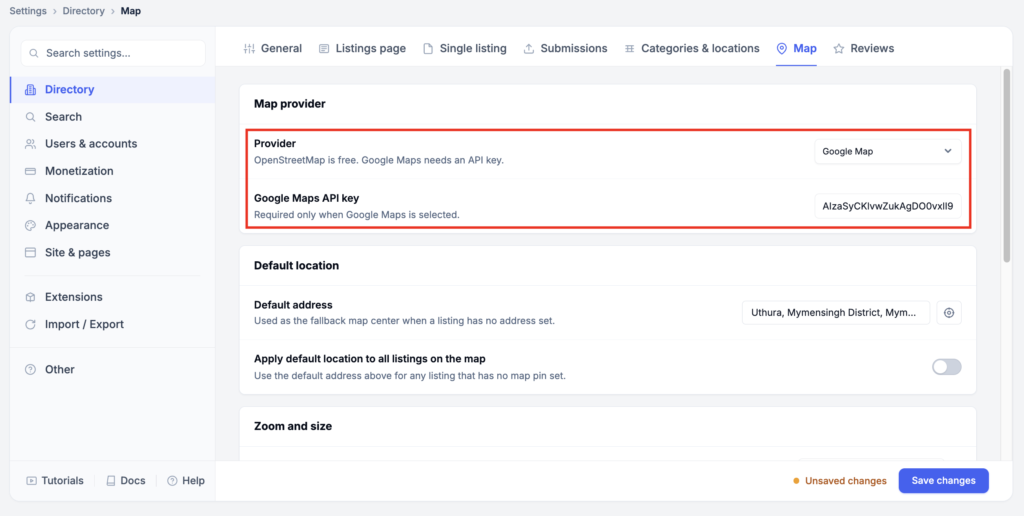
Caption: Map provider set to Google Map, with the API key in place. The plugin reads this key.
In Google Cloud, Maps JavaScript API and Places API must be enabled, with billing active on the project.
Good to know before you install
- Reviews refresh weekly by default, so a review posted this morning may take up to 7 days to appear. Lower the refresh interval with a filter if you want it sooner.
- This is a display extension, not a review collector. Visitors read Google reviews here and click through to Google to leave one — the Places API has no submission endpoint.
- Google requires attribution when you display Places data. The View on Google control and the Google mark in the summary bar satisfy it; don’t remove them without providing an equivalent.
- Directorist’s own review system is untouched. You can show Google reviews and your native reviews on the same listing page.
Released under GPLv2 or later.
Related Products

Auto WebP Converter
Automatically converts JPEG and PNG uploads to WebP before WordPress stores them. Faster pages, smaller backups, zero duplicates.

Directorist - Advanced Fields
Adds advanced custom fields like iframe, shortcode, video, editor, featured checkbox, repeater to Directorist listing forms and displays.

Directorist - Advanced Social Links
An extension for Directorist plugin that adds advanced social networking options to listing forms and single listing pages.

Directorist - Affiliate
Turn visitors into promoters with referral links, tracked commissions, flexible payouts, and a complete affiliate dashboard for Directorist.

Directorist - Bulk Actions
Streamline directory management with powerful bulk operations for listings and taxonomies. Import, export, update, and delete at scale.

Directorist - Category Based Tags
Filter Directorist tags by selected categories on tag edit, add listing, and search forms with optional fallback behavior.