

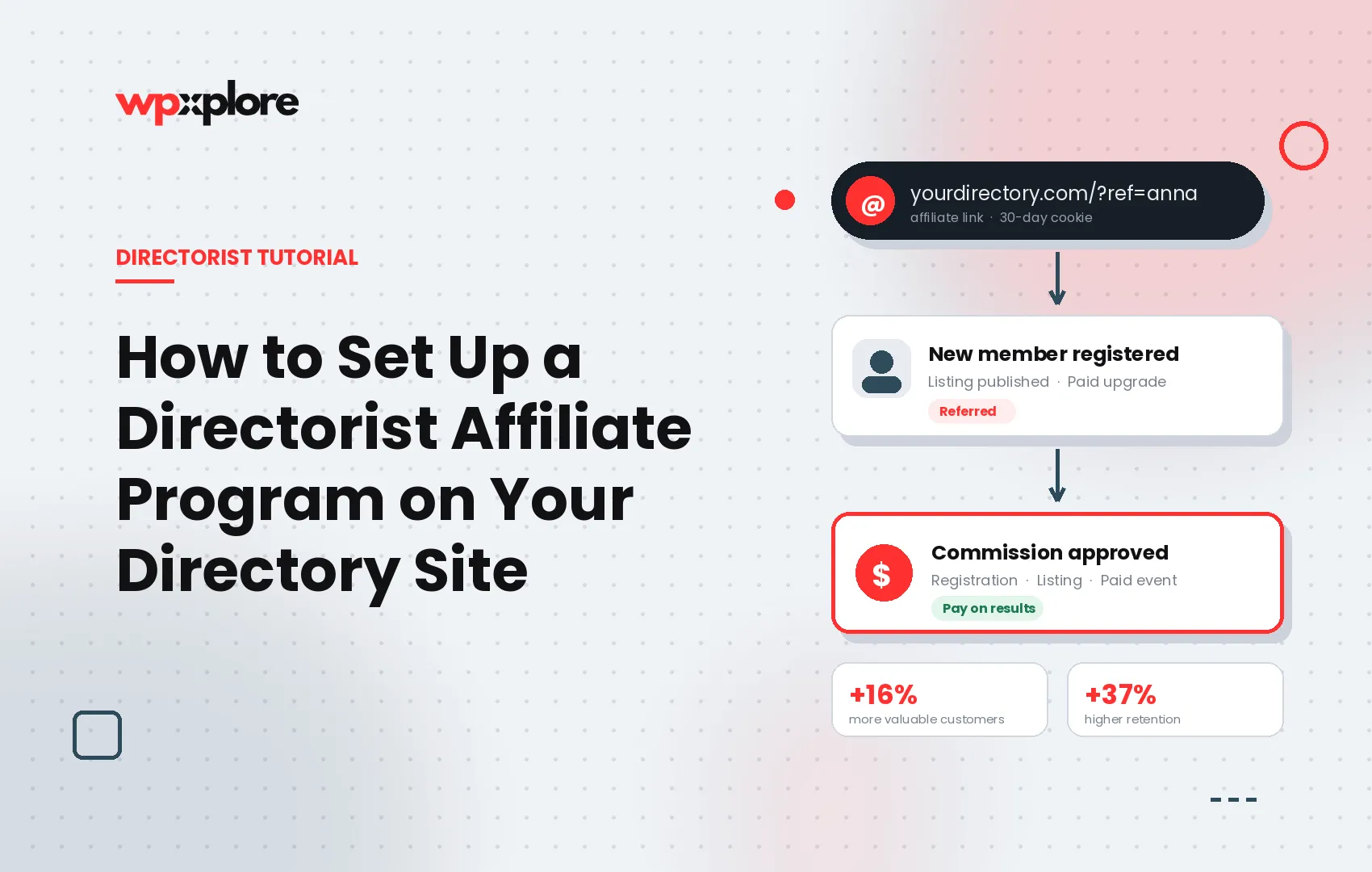

“Directorist affiliate program” means two different things, and which one you want depends on the answer.
If you want to earn commission by promoting the Directorist plugin, that is wpWax’s reseller program, and you sign up at directorist.com. This guide is not for you.
If you run a directory built with Directorist and want your own members to promote your site in exchange for commission, keep reading. Directorist has no built-in feature for this, and this guide covers how to add one, what you can pay commission on, and what to set the rates to.
Key takeaways
- A Directorist affiliate program gives each approved member a personal referral link. They earn a commission whenever someone they send registers, submits a listing, or buys a pricing plan or featured spot.
- Directorist core includes pricing plans, featured listings, and claim listing, but no affiliate or referral system for site owners.
- General WordPress affiliate plugins track e-commerce orders. They cannot see Directorist events like registration, listing submission, or listing approval, which are the conversions a directory actually runs on.
- Nielsen’s 2021 Trust in Advertising study, covering 40,000 respondents across 56 countries, found that 88% trust recommendations from people they know more than any other channel.
- The Directorist Affiliate extension runs the whole program inside wp-admin: tracking, approvals, fraud checks, and CSV payouts.
Why paid ads are the wrong first channel for a young directory
Every directory lives or dies on three numbers: registered users, published listings, and paid upgrades. Ads buy all three, but the bill keeps coming in, and the traffic stops the day you pause the campaign.
Referred users behave differently. A Journal of Marketing study by Schmitt, Skiera, and Van den Bulte tracked referred customers over six years and found them roughly 16% more valuable than comparable customers acquired through other channels, with higher retention. An affiliate program applies that effect on a pay-for-results basis. No conversion, no cost, which matters when margins on a young directory are thin.
How does an affiliate program work on a directory website?
An affiliate program gives each approved partner a unique referral link. When a visitor arrives through that link and later converts, the partner earns a commission you define. You review each referral before any money moves.
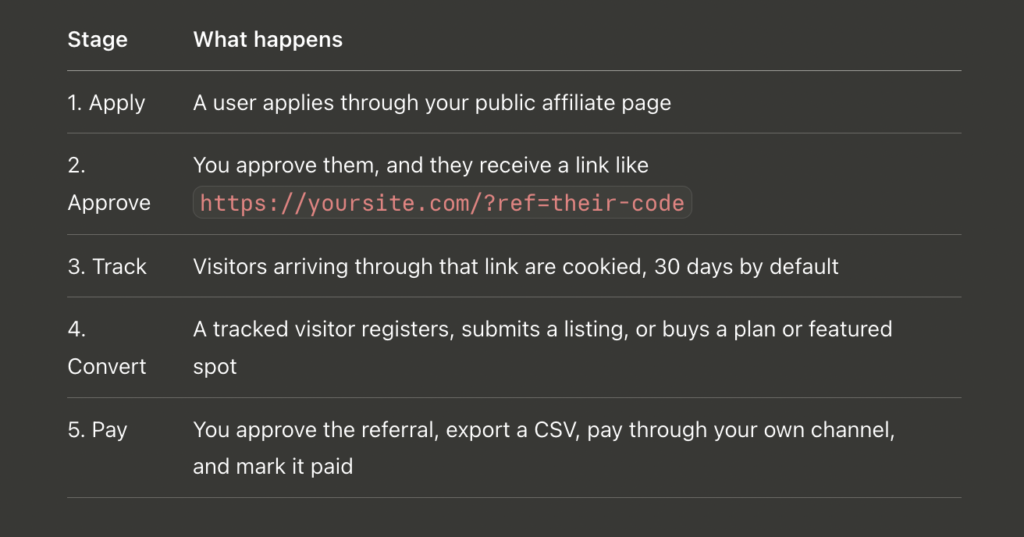
The ?ref= parameter works appended to any URL on your site, so a homepage, a category page, and a single listing all count as entry points. That matters more than it sounds: affiliates promoting a directory usually link to the specific listing they’re promoting, not your homepage.
Does Directorist have a built-in affiliate program?
No. Directorist ships pricing plans, featured listings, and claim listings, but nothing that lets a site owner reward members for referrals. The affiliate program promoted on directorist.com is wpWax’s reseller program for the plugin itself, which pays you for selling Directorist and does nothing for your directory.
Why general WordPress affiliate plugins do not fit a directory
Plugins like AffiliateWP, SliceWP, and Ultimate Affiliate Pro are well-built and solve different problems. They are designed around e-commerce, so they track orders in WooCommerce or Easy Digital Downloads.
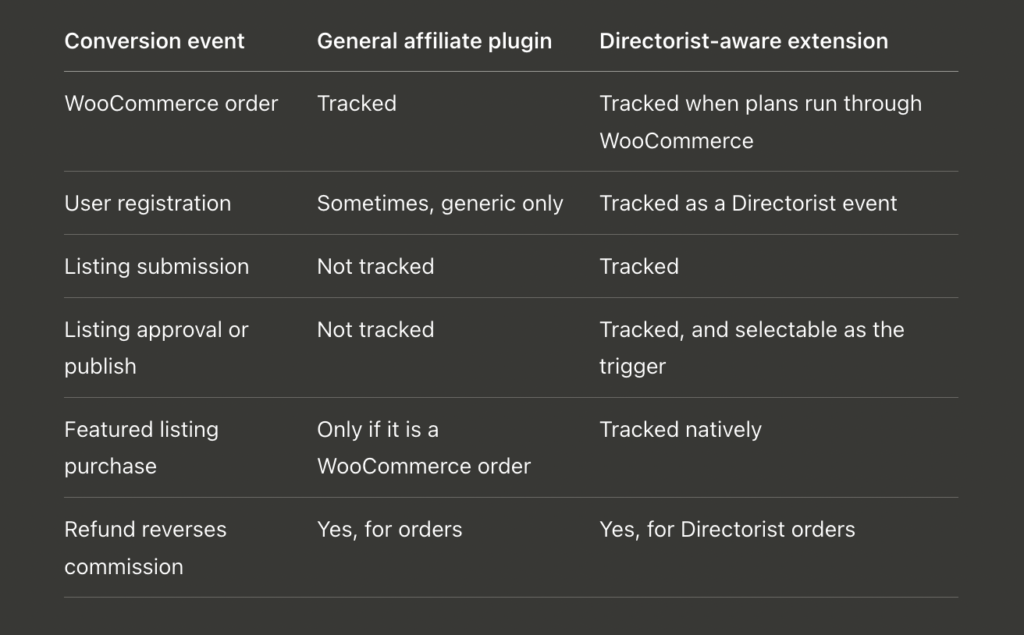
If your pricing plans are sold through WooCommerce, a general affiliate plugin can track that purchase. What it cannot do is reward the events unique to a directory, and on most young directories registrations and listings are the conversions worth paying for, because the paid upgrades come later.
What the Directorist Affiliate extension does
It adds a full affiliate system to an existing Directorist install:
- Gives every approved affiliate a personal
?ref=link that works on any page - Tracks visits with a cookie, 30 days by default, using first click or last click attribution
- Pays flat commissions on referred registrations and listing submissions
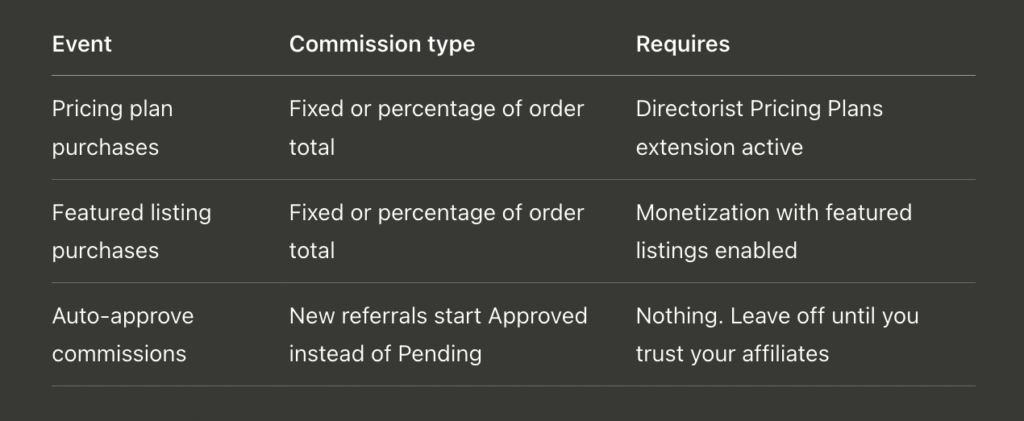
- Pays fixed or percentage commissions on referred pricing plan and featured listing purchases
- Adds six screens under Directorist → Affiliate: Dashboard, Affiliates, Referrals, Visits, Payouts, and Settings
- Gives affiliates a front-end dashboard with live stats and a one-click copy button
The safety behavior matters as much as the tracking:
- Nothing pays automatically. Every referral starts as Pending unless you deliberately enable auto-approval.
- Refunded or canceled orders automatically reverse their commission.
- Self-referrals are blocked, and one sign-up or order can never be credited twice. Deduplication is enforced at the database layer, not in the interface.
- The application form filters bots with an invisible honeypot.
What you need before installing
- WordPress 5.8 or higher
- PHP 7.4 or higher
- Directorist 8.7.3 or higher, installed and active
- The
directorist-affiliateZIP: [EXTENSION URL] - Optional, for plan commissions only: the Directorist Pricing Plans extension
- Optional, for featured commissions only: Directorist monetization with featured listings enabled
The extension hooks Directorist events, so Directorist must stay active. This is a custom development extension rather than part of a standard Directorist install.
How to set up a Directorist affiliate program, step by step
Step 1: Install and activate. Go to Plugins → Add New Plugin → Upload Plugin, choose the directorist-affiliate ZIP, install, then activate. The extension silently creates its database tables and adds an Affiliate item to the Directorist menu.
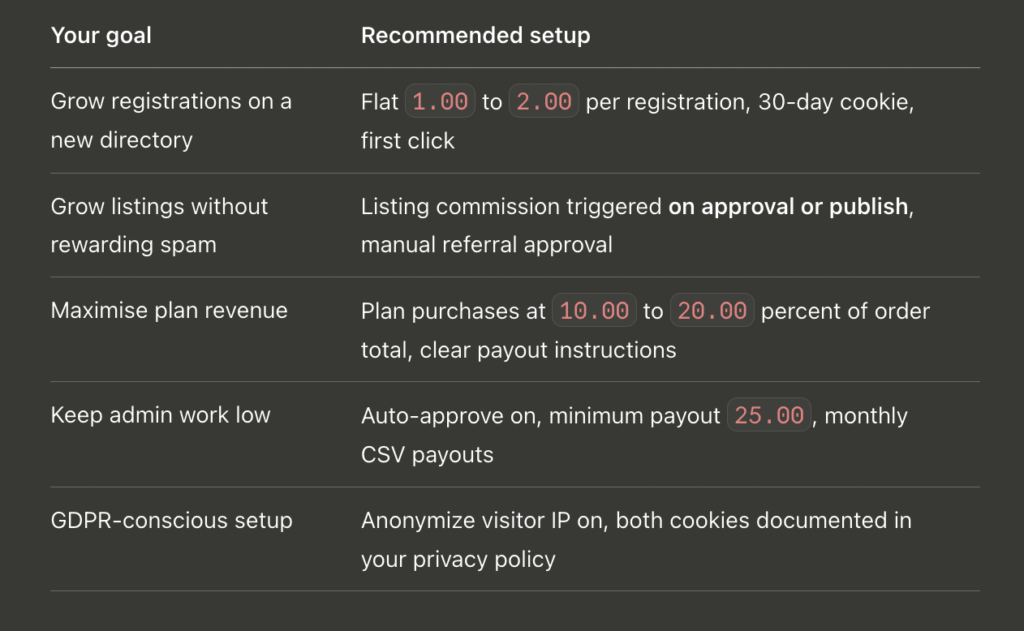
Step 2: Set your commission amounts. Open Directorist → Affiliate → Settings and enter flat amounts for registrations and listings, for example 2.00 : and 5.00. Save. A confirmation appears without a page reload.
Step 3: Publish a “Become an Affiliate” page. Create a page and add the shortcode [directorist_affiliate_registration]. Logged-out applicants get a WordPress account created automatically. Logged-in users see their details pre-filled.
Step 4: Publish an “Affiliate Area” page. Add [directorist_affiliate_dashboard] to a second page. The same dashboard also appears as an Affiliate tab inside the Directorist user dashboard, so this page is optional, but having a real URL makes it linkable from your menu and your listing submission confirmation email.
Step 5: Approve your first affiliate. When an application arrives, open Directorist → Affiliate → Affiliates, click View details to read their website and promotional channel, then Approve. They get an email, and their link goes live.
Step 6: Test the loop before you announce it. Open a private window, append ?ref=CODE to your homepage, register a test account, then confirm the visit and referral appear under Visits and Referrals. If your site uses full-page caching, this is the step that reveals the problem described in the troubleshooting section below.
Settings that actually change outcomes
Everything lives under Directorist → Affiliate → Settings in sub-tabs, but it’s a single form underneath, so a single save stores all tabs.
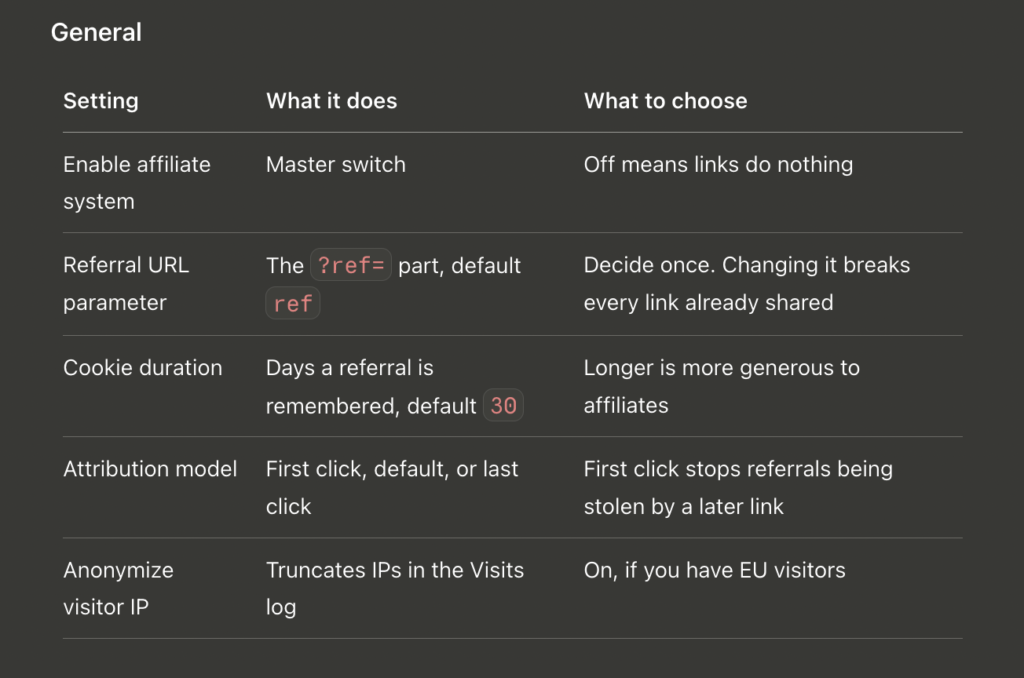
Registration commission. A flat amount paid when a referred visitor creates an account. Keep it small. Registration is the top of your funnel, not the money event, and a generous registration bounty is the setting most likely to attract low-quality sign-ups.
Listing commission. The amount matters less than the trigger. On listing submission, credits the moment a listing is created. On listing approval or publish, credits only when it goes live. If you moderate listings at all, choose approval, because it means spam submissions earn nothing.
Order commissions. These are the real revenue events.
Payout. Set a minimum payout amount (0 disables it) and write your payout instructions, which appear on every affiliate’s dashboard. Something as plain as “PayPal, 1st of each month, $25 minimum” answers the question before anyone emails you to ask it.
Advanced. Delete data on uninstall is off by default. Turn it on only if you want tables, settings, and user meta removed when the plugin is deleted.
For developers. Commission filters let you run promotions without touching settings. Doubling listing commissions for a launch month:
php
add_filter( 'directorist_affiliate_listing_commission', function ( $amount, $trigger ) {
	return $amount * 2;
}, 10, 2 );
What commission rate should you offer?
Affiliate commissions across industries typically range from 5% to 30%, per Referral Rock’s benchmarks. For a directory selling recurring plans, 10-20% of the order total is a sensible opening position. Registrations and listings use flat amounts, so start low and raise them for campaigns rather than starting high and cutting later, which affiliates notice and resent.
Troubleshooting
Referral links do not set the cookie. Full-page caching or a CDN is serving cached HTML that skips tracking. Exclude URLs containing your referral parameter from cache, or configure the cache to vary on it. This is by far the most common setup failure, and it is silent, which is why step 6 exists.
Visits are recorded, but no referrals appear. Check four things in order: the affiliate was approved at the time of conversion, the relevant commission type is enabled, the conversion fell inside the cookie window, and the visitor was not the affiliate.
Pricing plan purchases are greyed out. The Directorist Pricing Plans extension is not active. For the featured event, monetization or featured listings are off.
An affiliate was skipped during bulk payout. Their selected referrals total less than your minimum payout amount. The notice says how many were skipped.
The application form sticks on “Submitting…”. Open the browser console. Usually a security plugin blocking admin-ajax.php for logged-out visitors, or a JavaScript error from another plugin. The form also works with JavaScript disabled, which is a quick way to confirm which side the fault lies.
Start with the audience you already have
Your most motivated marketers are already registered on your directory. They chose your site, they submitted a listing, and some of them already recommend it without being asked or paid.
An affiliate program gives them a reason to keep doing it, and gives you a channel that only costs money after it works. Install the extension on staging, set two commission amounts, publish the application page, and approve your first affiliate this week. Re-test the tracking loop after major Directorist updates, because caching rules and hook changes are the two things that quietly break referral tracking.
Get the Directorist Affiliate extension:
5. FAQ
Does Directorist have a built-in affiliate program?
No. Directorist core includes pricing plans, featured listings, and claim listing, but no way for a site owner to reward members for referrals. The affiliate program on directorist.com is wpWax’s reseller program for promoting the plugin itself. Adding a referral system to your own directory requires an extension.
Can I use AffiliateWP with Directorist?
(new) Partly. AffiliateWP tracks WooCommerce and Easy Digital Downloads orders, so if your Directorist pricing plans are sold through WooCommerce, it can pay commission on those purchases. It cannot track Directorist-specific events such as user registration, listing submission, or listing approval, because it has no knowledge of those hooks.
How do affiliates get paid?
You pay them outside WordPress through your own channel, usually PayPal or bank transfer. The extension keeps the books: export a CSV of approved unpaid commissions, pay through your provider, then mark those referrals as paid. The payout history records who was paid, how much, and when.
What commission rate should I offer?
Affiliate commissions typically range from 5% to 30% across industries, per Referral Rock’s benchmarks. For a directory that sells recurring plans, 10 to 20% of the order total is a reasonable starting point. Registration and listing commissions use flat amounts, so keep those small and raise them for promotions.
Can affiliates cheat the system?
The common abuse routes are closed. Self-referrals never count, a single sign-up or order cannot be credited twice, free orders earn nothing, and every referral waits for your approval by default. The Visits log records IPs and referrers, so repeated visits from a single IP are easy to spot.
What happens when a referred order is refunded?
The commission reverses automatically. When a pricing plan or featured listing order is refunded or canceled, the linked referral switches to Refunded or Canceled and is removed from the Payouts screen. Nothing is owed, and there is nothing to correct by hand.
Is an affiliate program GDPR-friendly?
It can be, with two steps. Enable Anonymize visitor IP so addresses are truncated at collection, and list the two tracking cookies, directorist_affiliate_ref and directorist_affiliate_visit in your cookie policy. Enabling delete data on uninstall gives you a clean exit.
Do I need the Pricing Plans extension?
(reworded) Only for plan commissions. Registration and listing commissions work only with core Directorist. Pricing plan purchases stay greyed out until the Directorist Pricing Plans extension is active, and featured listing purchases need Directorist monetization with featured listings enabled.
6. AEO pack
One-line answer
Directorist has no built-in affiliate program for site owners, so running one on your own directory requires an extension that tracks Directorist events: a referral link cookies the visitor, and commission is credited when that visitor registers, submits a listing, or buys a pricing plan or featured spot.Questions this post now answers
Does Directorist have an affiliate program?
Can I use AffiliateWP with Directorist?
How do I set up an affiliate program on a WordPress directory?
What commission rate should a directory pay affiliates?
What is the difference between the Directorist reseller program and running your own?
How do I stop affiliates earning commission on spam listings?


Leave a Comment